












First-Party Analytics

Catches Human-Like BotsYour Own DomainGA4 Alternative

First-party analytics that runs from your own domain, so blockers miss less and bots are filtered out. See your real traffic, clean users and the journeys behind every conversion, in one place.

Setup in 5 minutes
No credit card
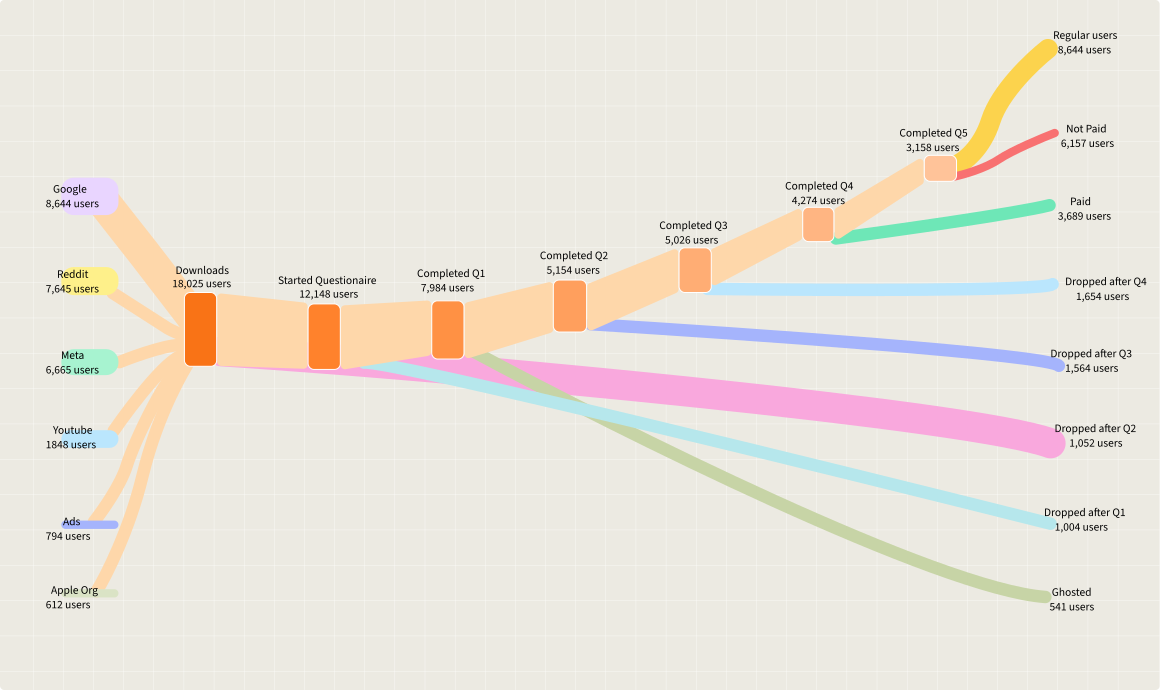
User journey from traffic sources through each step to conversion or drop-off

Trusted by agencies and brands running paid media

AffilinoBigfishClever DigitalKeetraxLegendListingLogicNumeroStormZealdBurst Digital
The problem

Why your analytics numbers do not add up

Third-party analytics was built for a web without ad blockers, privacy browsers or bot traffic.

Real visitors go missing

Scripts loaded from a third-party domain are easy for ad blockers and privacy browsers to strip, so real people never show up.

Bots look like people now

Modern bots are automated browsers that load pages, scroll and click like a real visitor. They pass network filters and land in the same report as your customers.

Nobody trusts the number

Analytics, the ad platform and your store all disagree, so every decision starts with an argument about data.

How first-party analytics works

One script on your own subdomain feeds one set of clean numbers.

  1. Step 01

    Add the script on your own subdomain, like datacops.yourdomain.com.

  2. Step 02

    See your total traffic, including visits blockers used to hide.

  3. Step 03

    Every session gets a verdict, human or bot, with the reason behind it.

  4. Step 04

    Follow real journeys and the channels that bring real people.

The same clean data feeds your ad platforms, so your reports and your ads agree.

See where real visitors come from, and where they drop off

Traffic Sources Background

See which channels bring real people

  • Search, direct, social, AI assistants and more, counted in clean users
  • Bots are taken out before a channel gets credit
  • Traffic from ChatGPT and other AI assistants gets its own channel

Channels

users only

Users

6,800

across 5 channels

Search4,210 62%
Direct1,320 19%
Social610 9%
AI assistants180 3%
Other480 7%

Know Your Users, Not Just Your Traffic

Track real user behavior across visits, devices, and time with complete session history, acquisition sources, and conversion paths all in one view.

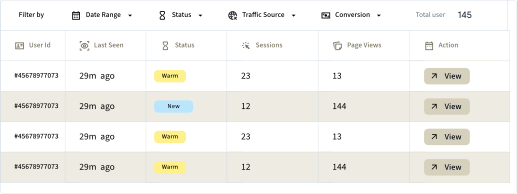
User Data table

See every unique user at a glance session count, devices, locations, and traffic source. Filter and analyze patterns instantly.

User Data Table Interface showing user IDs, status, and session metrics

User Data profile

Drill into any user's complete journey pages visited, referral source, purchases, form submissions, and repeat visits.

person
User Id
#45678977073
Acquisition
First Source:Google Organic Search
Landing Page:/blog/analytics-guide
First Seen:Jan 15, 2025
Last Seen
2 hours ago
Avg. Session
7m 30s
Total Sessions
47
IP Address
192.168.XXX

How DataCops sees your real traffic

Capture Background

One first-party script, served from your own domain

  • Runs first-party from datacops.yourdomain, not a blockable third-party host
  • One script, one CNAME, live in about 5 minutes, no container to host
  • Server-side collection on Cloudflare's edge, close to every visitor
  • Captures click IDs at the network level, so fbclid and gclid still reach your CAPI feed after browsers strip them
  • Recovers 15 to 25% of the sessions other setups lose

Traffic Visibility

10%
20%
30%
40%
50%
60%
70%
80%
90%
100%

First-Party Script

~78%

Blockers and ITP cut your sessions

Inside one session

Every flagged session shows why

Not just a bot count. Each session carries its verdict and the reasons behind it, so your team can check any number.

Verdict

Human or bot, with a confidence score. Example: Bot, high confidence.

Reasons

The signals that fired. Example: headless browser detected, data-center IP.

Network and place

VPN, proxy, Tor and data-center flags, with country, city, source and landing page.

Two layers: Cloudflare plus DataCops

Network tools stop the obvious bots. Bots that act like people get through, and that is where DataCops works.

  1. Step 01

    Cloudflare stops known crawlers, scrapers and bad IP ranges at the edge.

  2. Step 02

    A human-like bot passes, because it loads, scrolls and clicks like a visitor.

  3. Step 03

    DataCops checks it inside the browser and confirms it is automated.

  4. Step 04

    Its IP goes back to Cloudflare and is blocked at the network level.

Blocking runs in watch mode first, so no real customer is blocked by mistake.

Andrew Forsyth

“15 minutes to get server-side tracking live. After 3 days failing with another app and a DIY server-side Google Tag Manager, that alone sold me. Then support jumped on a Google Meet with me on a Sunday afternoon to finish the job. Nothing else comes close.”

Andrew Forsyth
Chief Executive Officer, Zeald
Delivery log
every event, every platform, with a reason
Live
Purchase to Meta
fbclid + hashed email
Delivered
Purchase to Google Ads
gclid
Delivered
Lead to TikTok
ttclid + phone
Delivered
Lead to Meta
bot session
Skipped
Purchase to Meta
waiting for consent
Held
Analytics and ads, one source

The numbers you report are the numbers you send

DataCops does not keep one count for dashboards and another for ad platforms. Both come from the same filtered sessions.

  1. 1
    Your own domain
    The script loads from datacops.yourdomain.com, so it is treated as part of your site.
  2. 2
    Bots filtered once
    A flagged session is left out of clean counts and is not sent as a conversion.
  3. 3
    Real journeys
    See the pages, sources and return visits behind each conversion.
  4. 4
    Same data to ads
    Meta, Google Ads and TikTok receive conversions from the same clean sessions.

A GA4 alternative built on clean data

Honest numbers you can run the business on, without sampling or third-party cookies.

Start Free
  • First-party script on your own subdomain, much harder for blockers to strip.
  • Every session gets a verdict with a reason and a confidence score, shown side by side with real traffic.
  • Browser checks catch automated and headless browsers that act like a real visitor.
  • Device and browser signals spots the same bot behind new IPs, for visitors who consent.
  • Our own IP intelligence across 360+ billion addresses flags VPN, proxy, Tor and data-center traffic.
  • Clean data goes into Segment and Amplitude, and every session can be pulled through the export API.
  • Clean user counts in aggregate, with no individual identified.
  • Works with any consent banner, or our own first-party banner built to IAB TCF v2.2. No consent means an anonymous session only.
  • Durable first-party identity of up to 400 days, set server-side.
  • Visitor locations from DataCops own IP service, not a third-party lookup.

One clean number across your stack

Your analytics and the conversions sent to your ad platforms come from the same filtered data.

monitoring Traffic
gpp_good Bot filter
route Journeys
Meta
Google Ads
TikTok
X
Reddit
Pinterest
Microsoft Ads
LinkedIn
Consent

Consent handled, without losing the bot check

Works with the banner you already have, or with the DataCops first-party banner.

Visitor says no

An anonymous session only: pages, device type and the bot check. No user ID and no device tracking.

Visitor says yes

Full analytics with a durable user ID, so returning customers are recognised.

A banner that loads

The DataCops banner runs from your own domain and is built to IAB TCF v2.2, so privacy browsers block it far less.

Your stack

Clean data in Segment and Amplitude

Keep the reports your team already uses. DataCops adds the verdict to them.

One event per session

Every session arrives as an event marked clean or bot, with the reasons attached.

Filter any report

Filter a chart or audience on is_clean and see real visitors only, by channel, country or page.

Export API

Pull every session and verdict through the DataCops export API. The data stays yours.

For your tech team

Safe to add, easy to remove

No slower pages

The script loads in the background (async) and does not delay page load.

Fails safe

If DataCops is ever down, your site keeps working. Only data collection pauses.

Clean removal

Delete the script tag and the DNS record. Nothing else is left behind.

DataCops vs third-party analytics

What each setup does out of the box.

DataCops
GA4 default
Server-side GTM
Script on your own domain
Only if you build it
Bot sessions filtered from counts
Known bots only
Clean users next to total traffic
Catches bots that act like people
Reason shown for every flagged session
Same data sent to ad platforms
Only if you build it
Geo-conditional consent
Needs a separate CMP
No code or server to run

Set up first-party analytics in three steps

No server to run and no tag manager to maintain.

  1. Step 1 1 min
    add_link

    Add your site
    Sign up and add your domain in DataCops.

  2. Step 2 3 min
    dns

    Add one CNAME
    Point datacops.yourdomain.com at DataCops in your DNS.

  3. Step 3 2 min
    code

    Paste the script
    Add the snippet to your site head. Clean numbers start with the next visit.

In short

First-party analytics with DataCops, in short

DataCops is a tool that gives you first-party analytics, a GA4 alternative, from your own domain, with a bot verdict on every session, so your reports and your ads agree.

How DataCops does it

1

One script on your own subdomain

The script runs on datacops.your-domain, so ad blockers and privacy browsers miss less than they do with a third-party analytics domain. You see total traffic, including visits blockers used to hide. With your DNS on Cloudflare, the free Worker reads click IDs at the edge.

2

A verdict on every session

Every session is marked human or bot with the reason behind it, checked against an IP database covering 360+ billion IPs and 350+ monitoring points. Channel reports can show users only.

3

Real channels, including AI assistants

Traffic from ChatGPT and other AI assistants gets its own channel, next to search, direct and social. A DataCops session works like a Google Analytics session: one visit, with a new session after 30 minutes of no activity.

4

A click log and visitor memory

Follow each ad click from landed to rendered, clean or flagged, converted and sent. Click IDs are kept on the server for up to 90 days, and a signed server-set cookie on your domain lasts up to 400 days where enabled, so returning visitors are recognised beyond Safari's 7-day cap.

5

The same clean data feeds your ads

Conversions go server-side to Meta, Google Ads, TikTok and LinkedIn, counted once against the pixel, and CRM sales go back as they close: HighLevel natively, any CRM by webhook, Shopify through the DataCops Shopify app. Real people only is a per-platform switch, off by default, and every form email is checked for disposable providers, domains with no mail server and an email risk score.

6

Consent, warm campaigns and a log

A first-party consent manager built on IAB TCF v2.2 comes from the same script. Ads Warmup sends up to 20,000 existing customers to Meta, Google Ads and TikTok. A delivery log row shows each send as sent, held, skipped or failed with the reason.

Best for: businesses that run paid ads and want one set of real-people numbers for reports and ad platforms: ecommerce, lead gen, clinics, B2B and agencies.

Free to start. See pricing.

When not to use DataCops

You need session replay, heatmaps or deep product analytics

PostHog or Matomo do that better. See privacy-friendly analytics compared.

You run no ads

A simple dashboard such as Plausible or Fathom may be all you need.

You need GA4 or BigQuery feeds

DataCops is a GA4 alternative, not a feed into GA4. Keep a container for GA4 and BigQuery data.

You need to self-host

DataCops is hosted. Matomo and Umami can run on your own servers.

Sources

Platform rules checked October 2026. Rules change; check the platform's own page before you build.

FAQ

First-party analytics loads the tracking script from your own domain, on a subdomain like datacops.yourdomain.com, instead of a third-party domain. That makes it much harder for ad blockers and Safari to strip, so you see visitors your old analytics often missed.

See your real traffic

First-party analytics on your own domain, with the bots filtered out.

Setup in 5 minutes. No credit card.

Live traffic quality

Updated just now

Visits · last 24h

487
Real users
35873.5%
Bots · auto-filtered
12926.5%

Without filtering, 26.5% of your reported traffic is bot noise inflating dashboards and draining ad spend.

Don't trust your analytics!

Make confident, data-driven decisions withactionable ad spend insights.

Setup in 2 minutes
No credit card