Integrations
Snapchat Conversions API
Connect Snapchat with a token you make yourself in Snap Business Manager. It takes about two minutes and does not depend on a Snapchat login.
What you need
- A Snapchat Business account where you are an Organization Admin.
- A Snap Pixel. If you have none, create one under Pixels first.
Connect with a Conversions API token
- 1
Open Business details
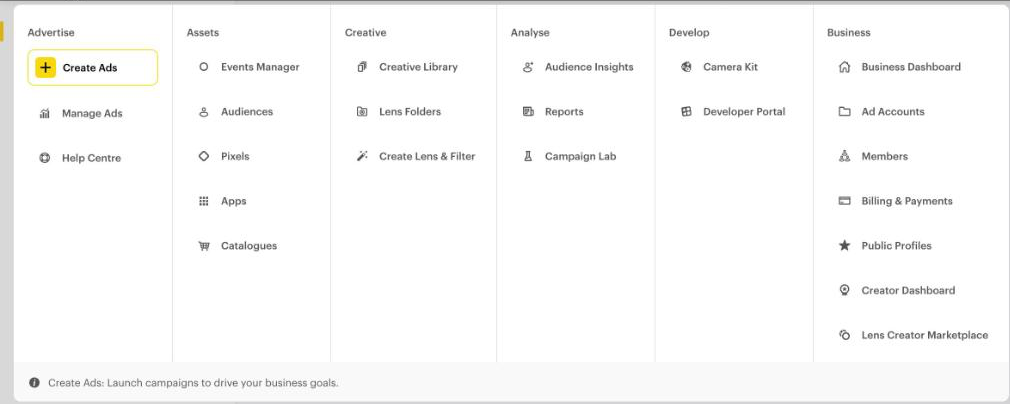
Open Snap Business Manager. In the menu choose Business Dashboard, then Business details in the left column. You must be an Organization Admin.
- 2
Generate the Conversions API token
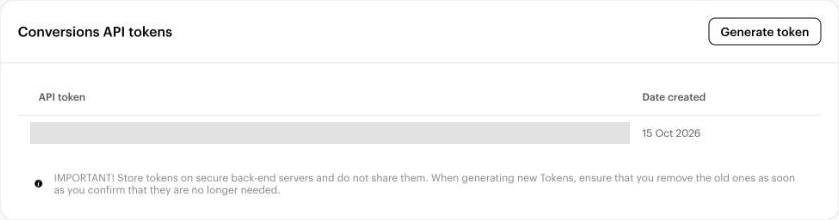
Scroll to Conversions API tokens and press Generate token. Copy it at once: Snapchat shows it only one time. Treat it like a password and never paste it into a chat or a screenshot. The token does not expire.
- 3
Copy your Pixel ID
In Business Manager open Pixels. The Pixel ID is under your pixel name, a code like
5ed9fc39-8866-....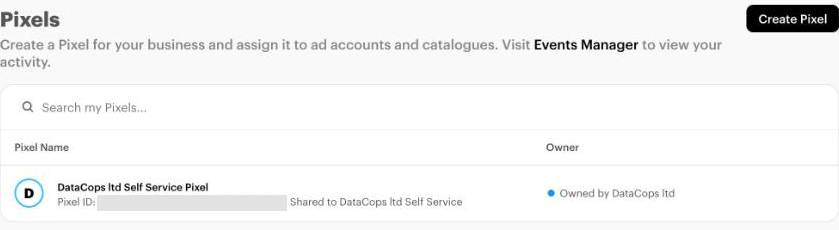
- 4
Paste both into DataCops
In DataCops open Configuration, press Use token on the Snapchat card, paste the token and the Pixel ID and press Connect.
Before saving, DataCops checks the token with Snapchat. If Snapchat accepts it, the connection is saved. If it refuses, you see Snapchat's reason straight away and nothing is saved.
What happens next
Clean conversions are sent to your pixel from then on, with the Snapchat click ID when it was captured. See every send, and every skip with its reason, in the Event log.