Integrations
Meta Conversions API
Send Facebook and Instagram conversions to Meta from the server, so they arrive even when the browser blocks the pixel. Every event is assembled from the whole DataCops platform, not a bare tag, so Meta receives clean, fully matched conversions, counted once. One-click connect, no code.
What it is
The Meta Conversions API, or CAPI, is the server-to-server way to report Facebook and Instagram conversions, instead of relying on the Meta Pixel in the browser. DataCops connects it for you in one click, with no code, and sends each conversion from the server with the signals Meta needs to match it to the person who saw or clicked your ad.But server-side sending is only half of it. A conversion is only as good as the match data attached to it. What makes DataCops different is where that data comes from: every part of the platform, first-party capture, the edge worker, the 400-day identity, IP intelligence, and email verification, feeds one clean Meta event. Meta is not receiving a pixel. It is receiving the full, verified record of a real buyer.
Why the Meta Pixel loses sales
The Meta Pixel runs in the browser, which is exactly where tracking is weakest, and it fails in three ways at once:
- It gets blocked. Ad blockers strip it, Safari and iOS limit it, and Brave removes it. The conversion simply never reaches Meta.
- It arrives thin. When the pixel does fire, it often carries just a cookie. Meta cannot confidently tie a cookie to a real Facebook or Instagram account, so the sale goes unmatched.
- It counts bots. A raw pixel fires for anything, including click farms and bot traffic, so Meta learns from fake conversions and spends your budget finding more fakes.
The result is under-reported sales, weak matching, and an algorithm optimising on noise. Every one of these is a data problem, and that is what DataCops fixes before Meta ever sees the event.
How DataCops builds each event
A DataCops Meta event is not captured in one place. It is assembled. As a visitor moves through your site, each part of the platform adds what it knows, so that by the time a conversion happens, the event is already complete, verified, and ready to match.Here is what each part adds to that middle step, in order:
- First-party capture keeps the ad click alive. The Meta click ID (fbclid) and its cookies (fbp, fbc) are captured on your own domain, so ad blockers and Safari cannot strip them the way they strip a third-party pixel.
- The edge worker recovers what the browser drops. If the click ID would have been lost, it is caught server-side at the edge, so the strongest match signal survives even when the browser fails.
- The 400-day durable identity attaches the real person. If someone converts anonymously today but identified themselves on an earlier visit, DataCops finds that stored profile and attaches their email, name, and a stable ID, so a conversion that would have gone out with nothing to match on goes out with a verified identity behind it.
- IP intelligence supplies a clean IP and location. The same IP checked for fraud is the one sent to Meta, so location and device signals are real, not a datacentre or VPN address.
- Email verification makes the match key trustworthy. The email is confirmed to be a real, deliverable address before it becomes a hashed match key, so you are not matching Meta against a fake or disposable inbox.
- The fraud verdict gates out the fakes. Bots, click farms, and invalid traffic are stopped here. By default only verified, human conversions are sent, so Meta never learns from noise.
- The consent gate decides if it is allowed. Where consent is required, the event is only sent if consent is in place, resolved server-side, so you stay compliant without dropping the conversions you are allowed to keep.
Only after all of that does the event become a Meta conversion. That is the difference between a pixel firing into the void and a fully built, verified event arriving at Meta ready to match.
The match signals sent to Meta
Meta matches a conversion to a person using match signals, and it matches better the more strong signals it receives. A browser pixel usually manages one. DataCops assembles the full set, every customer detail normalised and securely hashed on the server before it leaves, so Meta can match on it without ever receiving a raw email or phone number.
| Signal | What it does for matching | Where DataCops gets it |
|---|---|---|
| fbc / fbclid | The Meta ad click. The single strongest link between a sale and the ad that drove it. | First-party capture, recovered at the edge if the browser drops it |
| fbp | The Meta browser ID, so returning visitors stay tied to earlier activity. | First-party capture on your own domain |
| Email (hashed) | Matches the buyer to their Facebook or Instagram account. | Verified real, then normalised and hashed on the server |
| Phone (hashed) | A second strong match key when the email does not resolve. | Normalised and hashed on the server |
| Name, city, state, zip, country (hashed) | Extra match keys that lift Event Match Quality. | Stored profile from the 400-day durable identity |
| External ID (hashed) | Your own stable ID for the person, so Meta can join repeat events to one customer. | 400-day durable identity |
| IP address | A coarse match and location signal Meta expects on every server event. | IP intelligence, the same clean IP used for the fraud verdict |
| User agent | Pairs with the IP so Meta can resolve the device. | First-party capture |
Alongside the person, each event carries the conversion itself: the event name mapped to a standard Meta event like Purchase or Lead, the real time it happened, the order value and currency, and the page it happened on. Nothing is fabricated, and no raw personal detail is ever sent, only the securely hashed version Meta asks for.
Counted once, never twice
Every DataCops event carries one steady ID, and that same ID is the one Meta uses to spot a repeat on its side. So if you keep your existing Meta Pixel running next to DataCops, Meta sees the pixel event and the server event share an ID and keeps only one. Your numbers do not double.
This is what lets you switch on server-side delivery without ripping anything out. Run both, confirm the server events are landing and matching better, and retire the pixel whenever you are ready. DataCops also catches a repeat of the same order before it goes out, so a store that fires a conversion twice still only reports it once.
Connect in one click
This is the whole setup. No code, no container, no developer. If Meta refuses the login for your account, connect with a token instead.
Connect your Meta account
Log in to Meta once from DataCops. That is the only permission step.
Pick your pixel
Choose the Meta pixel, or dataset, you want conversions sent to.
Map your events
In Event Manager, map each conversion to a standard Meta event, like Purchase or Lead, one time.
From then on, every clean conversion is built, matched, and delivered to Meta automatically. There is nothing to maintain, and no code that can silently break.
Or connect with a Conversions API token
A Conversions API token is made on your own pixel, in your own Events Manager. It belongs to the pixel, not to a person, so it keeps working when someone leaves your business, it does not expire after 60 days, and it does not depend on the Facebook login. Use it when the one-click login is refused, or if you simply prefer it.It takes about two minutes. You need to be an admin of the business that owns the pixel.
-
Open your pixel's settings in Events Manager
Go to Events Manager, click your pixel (dataset), then the Settings tab. Scroll down to Set up direct integration, keep Set up with Dataset Quality API selected, and click Generate access token.
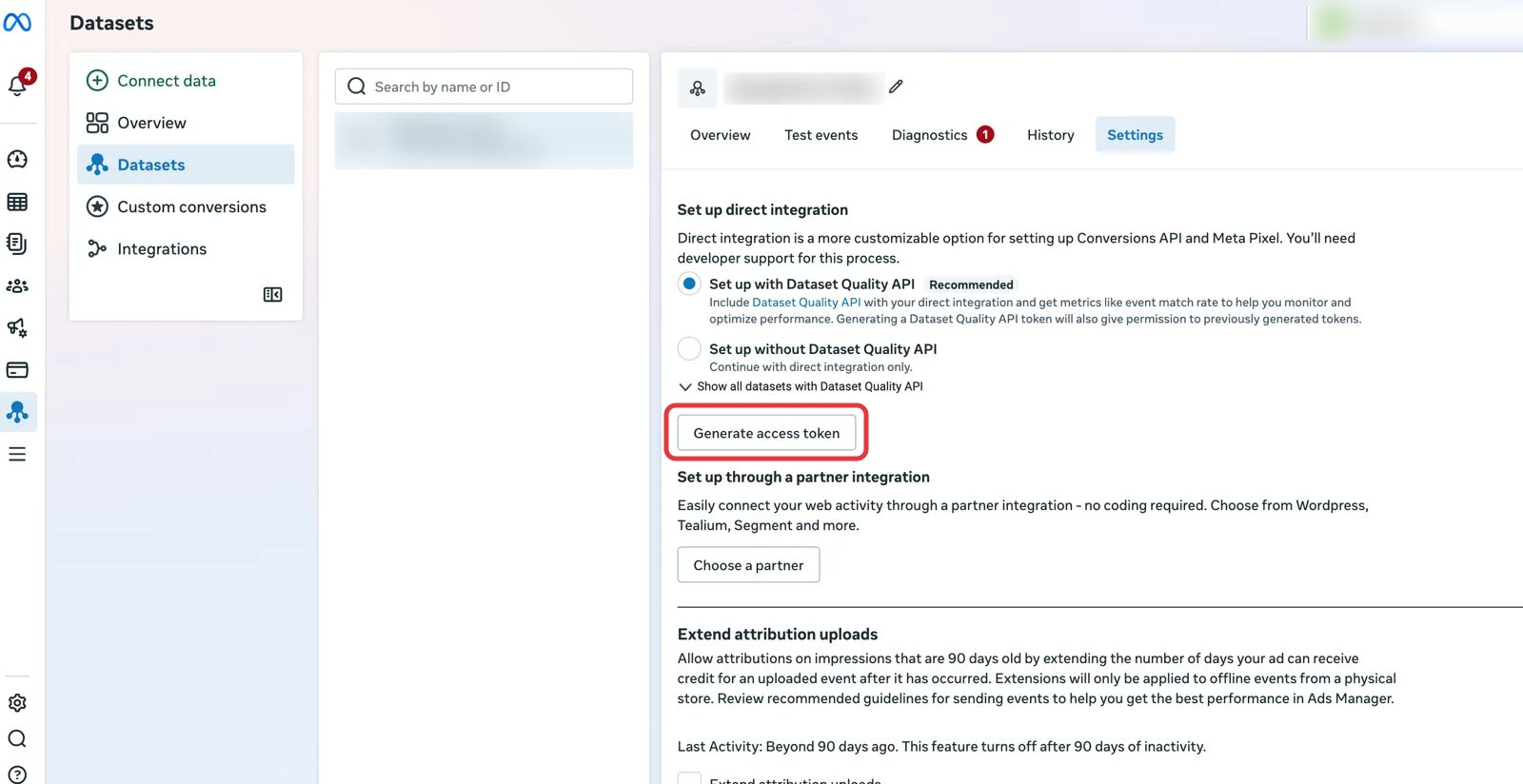
Pixel Settings tab. Names and IDs are blurred in this example. -
Copy the token
Meta shows the token once and does not store it, so copy it straight away. Also copy your Pixel ID, the number under your pixel's name.
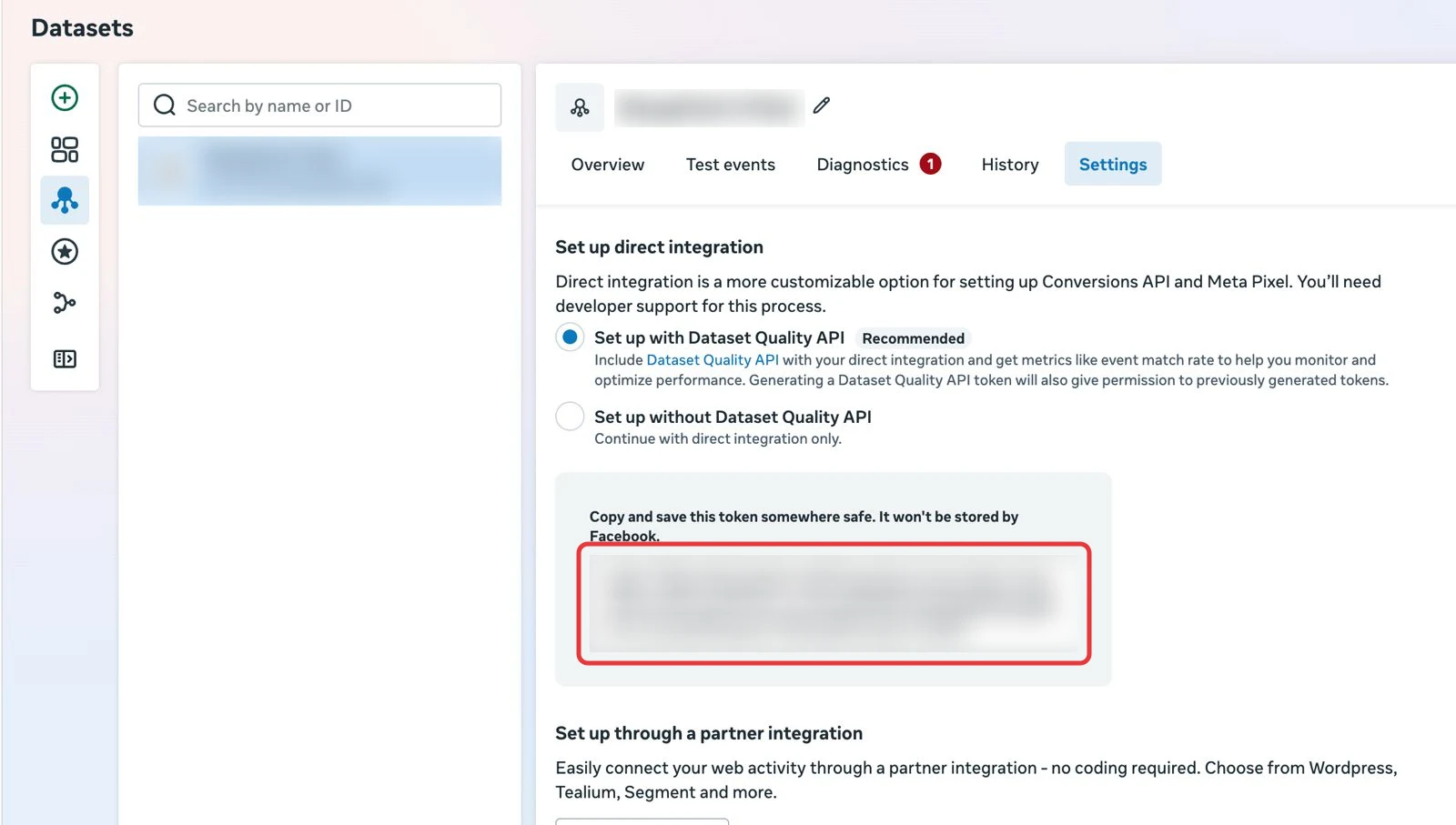
The token appears in this box. Treat it like a password: never share it in a chat or a screenshot. -
Paste both into DataCops
In DataCops, open Configuration. On the Meta card, press Use token, paste the token and the Pixel ID, and press Connect.
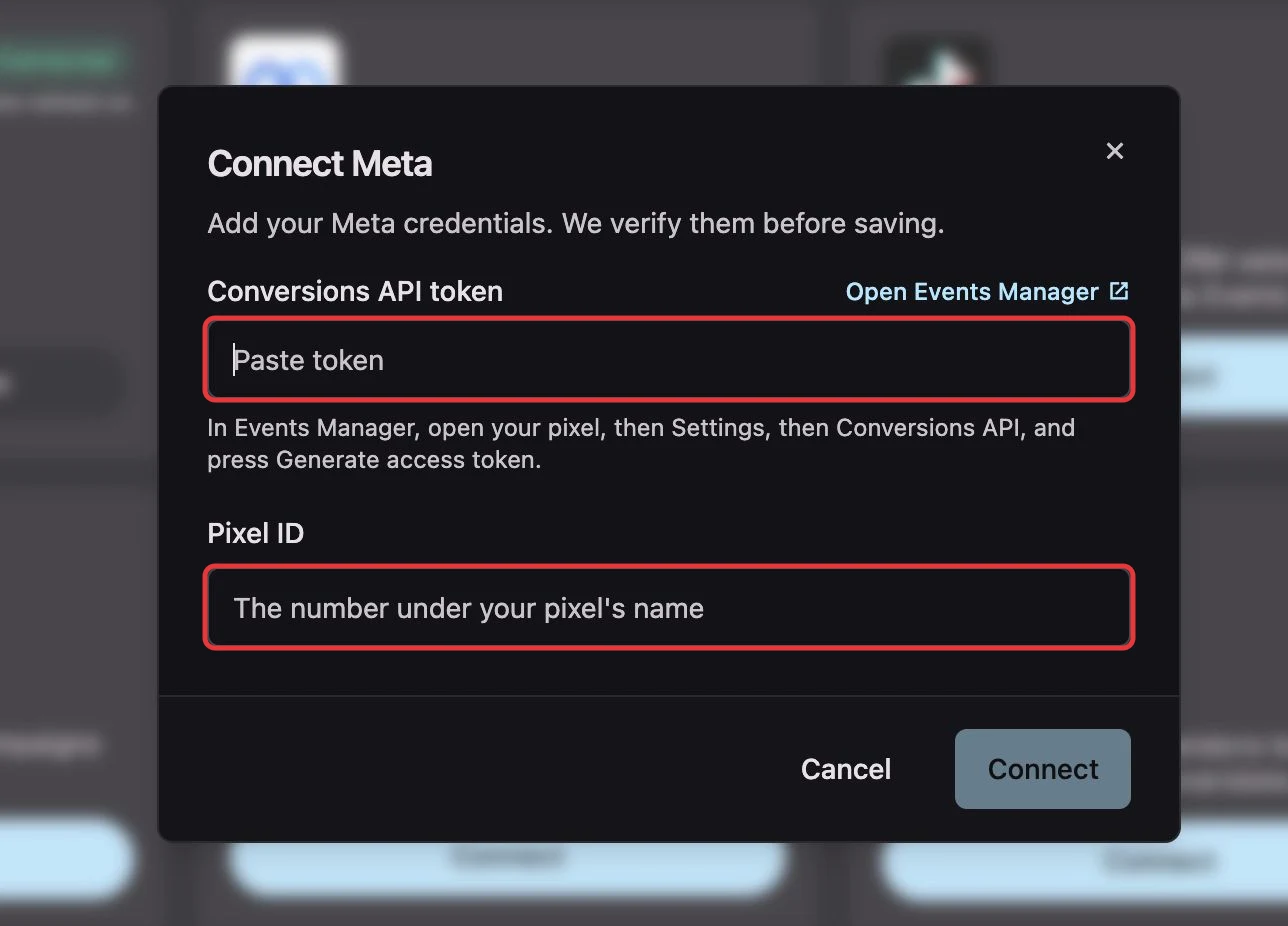
The Connect Meta dialog in DataCops.
Before saving, DataCops sends one test event with the token. Meta keeps it under your pixel's Test events tab and never counts it as a conversion. If Meta accepts it, the connection is saved and every clean conversion is sent from then on. If Meta refuses it, you see Meta's reason straight away and nothing is saved.
DataCops checks a token connection once a day. If the token stops working, the Meta card shows Needs reconnect with the reason, so you are never sending into a broken connection without knowing.
Higher Event Match Quality
Event Match Quality is Meta's own score for how well it can tie your conversions to real people, and it rises with every strong signal you send. Because a DataCops event arrives with the ad click plus a full set of hashed, verified customer details, and not just a cookie, Meta can match far more of your conversions to a real account. That does three things for your ads:
- It recovers volume. The conversions ad blockers and Safari used to hide now reach Meta, so it optimises on your whole audience, not a fraction.
- It sharpens matching. More strong signals per event means a higher share connect to a real person, so attribution and optimisation both improve.
- It cleans the signal. Only verified, consented, human conversions go out, so the algorithm learns from real buyers and finds more of them, instead of chasing the bots a raw pixel counted.
More conversions, better matched, all real. That is why a verified server-side conversion outperforms a browser pixel firing into the void.
An honest delivery log
A browser pixel fires and forgets. It never learns whether Meta accepted the event or dropped it, so a conversion path can be broken for weeks while your tag still shows as installed. DataCops records every send: one record per event, marked sent, skipped, or failed, with Meta's own reason shown, like an expired click or a connection that needs reauthorising. If a send fails for a temporary reason, it is retried. So you can see, per conversion, exactly what reached Meta and why, instead of trusting that a tag is still working.